
On May 28, Anthropic upgraded Claude’s flagship model to Claude Opus 4.8.
Model upgrades come around every so often, and most of the time I just skip them. I stopped to write this one for two reasons. First, it’s noticeably steadier and more capable at agentic work. Second, inside Claude Code it opened up Dynamic Workflows, which let you direct hundreds of agents working at once. That’s exactly the multi-agent direction I’ve been playing with for the past two years.
Let me be transparent about one thing up front: Penchan’s everyday AI partner (the underlying model that runs my drafts, fact-checks, and organizes files) also got upgraded to Opus 4.8 these past couple of days. So in a way, this article is it introducing itself. 😅
What to look at in this upgrade
| Highlight | In one line |
|---|---|
| Stronger across the board | Steadier agentic judgment, about 4x fewer unflagged errors when coding than 4.7, faster and more accurate tool calls. Computer-use (driving the browser and the machine directly) hits 84% on Online-Mind2Web, the best out there |
| Dynamic Workflows | A new Claude Code feature: Claude plans on its own, spins up dozens to hundreds of parallel agents, and reports back only after verifying (my real test is later in this article) |
| More honest | When stuck, it says outright that it’s unsure instead of forcing a progress report. Anthropic pitches it as its “most honest” model so far |
| No price increase | Same price as 4.7 ($5 per million input tokens, $25 output), and Fast mode is faster and cheaper |
In one line: the same money buys you a brain that does more and is more straight with you. The most direct benefit for everyday users is that you don’t have to change anything. Just pick Opus 4.8 in the model menu on claude.ai or Claude Code.
Stronger capability: steadier judgment, cleaner code, and it drives the computer itself
The most concrete progress this time is in “reliability when actually doing the work.” Anthropic’s evaluations say that when Opus 4.8 codes, it’s about 4x less likely to leave unflagged flaws than 4.7. Its judgment on agentic tasks is steadier, and its tool calls are faster and more accurate. Computer-use (the kind of ability that lets the AI directly drive the browser and the machine) is among the strongest available too.
Anthropic published a comparison chart that spells it out:
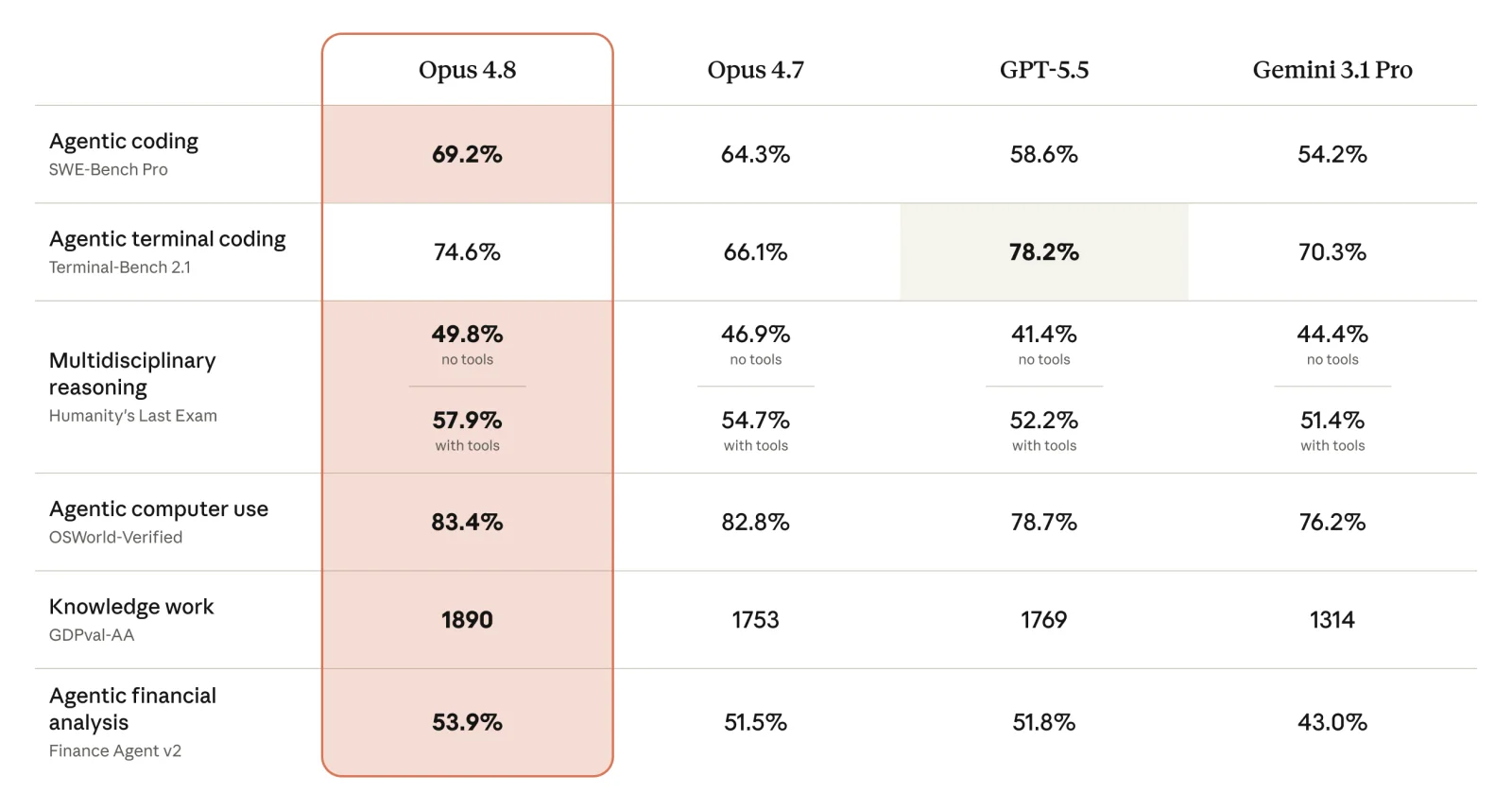
The chart pits Opus 4.8 against its own 4.7, GPT-5.5, and Gemini 3.1 Pro. Opus 4.8 leads 4.7 by a clear margin on agentic coding (SWE-Bench Pro 69.2%), computer operation (OSWorld-Verified 83.4%), knowledge work (GDPval-AA at 1890), and financial analysis. It also has items it loses on: in terminal coding (Terminal-Bench 2.1), GPT-5.5’s 78.2% beats Opus 4.8’s 74.6%. Winning where it wins and honestly marking where it loses fits neatly with the “honesty” it leads with.
The part I value most here is the honesty. When you hand a whole stretch of work to an AI to run on its own, the truly scary thing is when it “fakes understanding”: it confidently tells you it’s done when it isn’t, buries a bug in the code and writes it up with a straight face, and never mentions it. That’s exactly what Opus 4.8 fixes. It’s more willing to say “I’m not confident here” when it gets stuck, and it won’t force a progress report when the evidence is thin. Several outlets have therefore described it as Anthropic’s “most honest” model to date.
This sounds abstract, but it’s very real for anyone who actually delegates tasks. An assistant that raises its hand to say “I’m not confident” is far more useful than one that always replies “all done,” because you know where to go back and check.
effort and ultracode: one old feature, one new switch
The concept of effort (how hard the model works) is actually nothing new. Longtime Claude Code users should know xhigh well; it decides how much energy Claude spends thinking through a problem. 4.8 tidied it up: you can now adjust it directly on claude.ai too, across three levels of default (high), extra (which in Claude Code is xhigh), and max. Simple rule of thumb: dial it down on easy things to save tokens, dial it up on hard ones to chase quality.
The genuinely new and most fun part is ultracode. Flip it on in the effort menu and it automatically sets effort to xhigh, and lets Claude decide for itself when to deploy the Dynamic Workflow I’ll cover next. Here’s what it looks like actually running inside Claude Code:
The real headliner: Claude Code’s Dynamic Workflows
If the model itself is “a brain that does more,” then Dynamic Workflows is the “new pair of hands” that excited me most this time.
Let me explain in plain terms what it does. Before, when you asked Claude to do something, one AI did it start to finish. Dynamic Workflows instead lets Claude first understand your request, draft its own “division-of-labor script,” and then spin up dozens to hundreds of parallel agents in one go, slicing the work into chunks and tackling them at the same time. What’s even neater is that it has different agents come at it from different angles, poke holes in each other’s work, and iterate until the answer converges. It hands the result back only after verifying it. If it gets interrupted partway, it saves progress automatically, so you can pick up where it left off instead of starting over.
An engineer at CyberAgent put it precisely: it fills exactly the gap between “throwing a single agent out there” and “building an entire agent team yourself.”
So how big a job can it handle? The example Anthropic gives is rewriting the core of Bun (a JavaScript runtime) from Zig to Rust: 750,000 lines of code, 11 days, 99.8% of the existing test suite passing. Other typical scenarios include large-scale cross-file code migrations, bug hunting and security audits across an entire service, and finding dead code nobody uses.
A few realities to be clear about up front:
- Which plans have it: available on Max, Team, and Enterprise (Enterprise is off by default; an admin has to turn it on in settings), and also via API, Amazon Bedrock, Vertex AI, and Microsoft Foundry. It’s currently a research preview.
- It burns tokens: usage is noticeably higher than a normal conversation, and Anthropic recommends starting with a small, well-scoped task to get a feel for it.
- How to turn it on: there are two ways. One is to just ask Claude to “build a workflow” for you. The other is to flip on
ultracodein the effort menu and let it decide for itself when to use one. The first time it triggers, it asks you to confirm.
A real test: one sentence, 30 agents reworking 300 of my config files
Talking about features is too vague, so let me just show you a run I did myself last night.
My entire OpenClaw core config set (rules, canon, all kinds of workflow docs) has been a mix of Chinese and English for years, and I’d long wanted to standardize all of it to English. But editing 300+ files one by one made my head hurt just thinking about it. This time I used Opus 4.8’s Dynamic Workflow to give it a shot: I described the goal in a single sentence, and once Claude finished planning it spun up 30 parallel agents at once, distributed the 300+ files among them to rework simultaneously, and then verified and converged on its own.
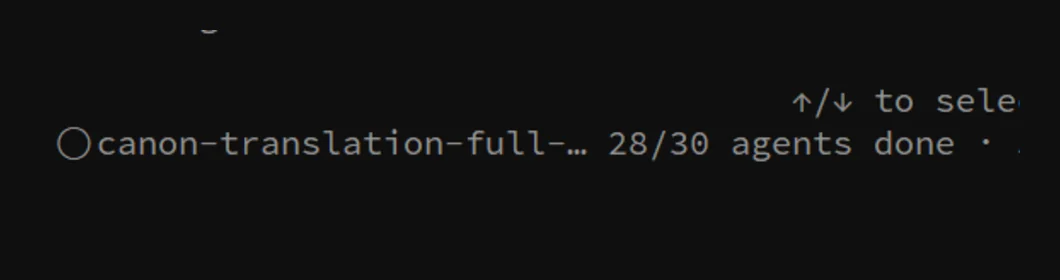
The shot above is the moment it was halfway through: the canon-translation workflow, with 28 of its 30 agents already done. Handling this manually would have eaten up a whole afternoon. This time it wrapped up in about the time it takes to drink a cup of tea.
Honestly, kicking off “300 files, 30 clones working at once” with a single sentence is something I used to be able to do only by brute-forcing a pile of scripts. That said, I don’t treat it as fully automatic: parallel agents still make mistakes, so at the end I make a habit of running a cross-review with another model family, to keep it from reviewing its own work and missing things.
One more detail I found genuinely fun, and I checked it on the spot: the whole thing stacks in layers. Claude plans and spins up a batch of parallel agents, and those agents in turn reach down another layer to a model from a different family (GPT/Codex) that scouts and fact-checks. So inside one workflow you get several layers of agents, across different model families, dividing the work.

How a regular person can get started now
- Just want to use a better model: do nothing. Pick Opus 4.8 in the claude.ai or Claude Code menu, same price as before.
- Want to try Dynamic Workflows: you need a Max, Team, or Enterprise plan. Start with a small, well-scoped task (for example, “help me inventory all the unreferenced files in this folder”) so you can clearly see how it divides the labor and how many tokens it spends.
- Not sure how to pick effort: keep the default for everyday use, bump it up a notch when you hit a hard problem, and turn on ultracode if you want Claude to judge for itself.
Penchan’s takeaway
What really moved me about this upgrade is its sense of direction: it makes “honesty” the headline, and it turns “one person directing a swarm of AI” into an everyday thing you can kick off with a single sentence in the terminal.
The line I’ll remember is: in the era of handing things off to AI, a model that dares to say “I’m not sure” is worth far more than one that’s always confident. As for Dynamic Workflows, I’ll keep using my own systems as guinea pigs, hit more pitfalls, and come back to share them with you.
If you want to nail down the underlying tools first, I’d start with the complete Claude Code guide; if you’re curious about “how one person directs multiple AI,” check out my notes on multi-agent orchestration.