


What Grok Is
Grok is the AI assistant from SpaceXAI (formerly xAI), a SpaceX company. It first appeared under the xAI name at the end of 2023, after Elon Musk founded xAI; after SpaceX acquired xAI in 2026, it was folded into SpaceX’s internal AI division, SpaceXAI (read the background here). By 2026, it has iterated to Grok 4.3.
You can use Grok in two places: the web interface at grok.com, or inside the X (formerly Twitter) app. Grok inside X is embedded directly into the social platform. You can ask it about real-time discussion around a topic, and it scans X posts to answer.
Grok’s answer style is more direct and less roundabout. Ask a controversial question and ChatGPT may explain both sides without giving a conclusion. Grok is more willing to make a clear judgment.
This trait still exists in 2026. Grok’s “persona” is straightforward and sometimes a little humorous. Whether you like that style is personal preference, but at least it feels different from ChatGPT.
Plans and Pricing
Grok’s paid structure is different from other AI tools because it is tied to X Premium. So most users who touch Grok are X users.
Free plan: available on grok.com, with basic conversation functions and limited daily quota. It can handle simple Q&A, translation, and short writing.
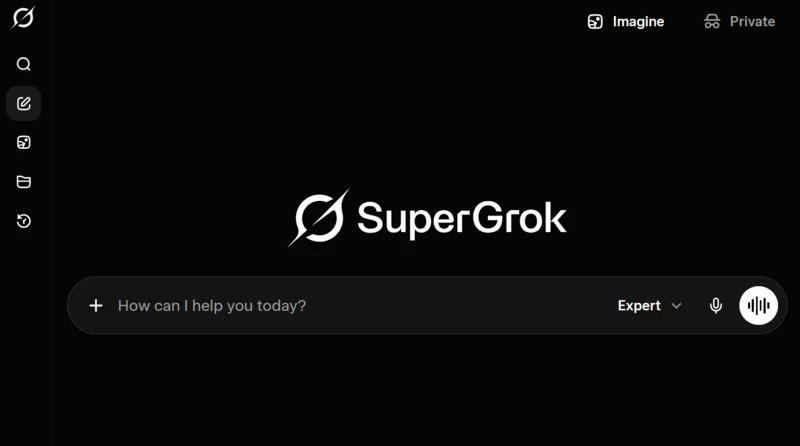
SuperGrok (US$30/month): the Grok 4 model, higher limits, Connectors, and image/video generation. It still sits against ChatGPT Plus or Claude Pro, but xAI’s grok-4.3 API context is 1M; do not treat API/model context as the same thing as SuperGrok chat context.
X Premium / Premium+: paid X subscriptions also include Grok inside the X app. Premium+ has higher Grok quota than Premium.
Pricing changes by region and time. Taiwan’s actual cost should follow the latest official SpaceXAI and X announcements.
For heavy X users, using Grok through X Premium+ is reasonable. If X is already part of the routine, there is no need to subscribe to a separate standalone plan.
Free vs Paid: How to Decide
| Need | Recommendation | Why |
|---|---|---|
| Try Grok or occasionally check live information | Free plan | grok.com login is enough for light Q&A and real-time lookup |
| Many daily turns and higher quota | SuperGrok Lite / X Premium | Solve quota first without jumping straight to the top plan |
| Grok 4 model, higher limits, and advanced generation features | SuperGrok | Fits high-frequency use; long-document context should follow the actual interface limits |
| You already live on X | X Premium+ | Grok becomes part of the X workflow |
For detailed free-plan limits and Chinese prompt tips, see Grok Chinese Free Guide.
Grok 4.3 Features
In 2026, Grok runs version 4.3, a major improvement over early versions.
Reasoning ability: Grok 4.3 has caught up to mainstream level in logical reasoning and complex problem analysis. Running the same test questions on Grok 4.3 and ChatGPT produced similar accuracy on math reasoning and code debugging. It uses a “Rapid Learning” architecture with weekly tuning, and the hallucination rate is much lower than earlier generations.
1M context window (API): xAI’s official docs now list grok-4.3 with a 1,000,000-token API context window, with higher-context pricing when prompts exceed 200K tokens. That keeps Grok viable for long documents, but the better framing is 1M-class long context, not a larger-than-mainstream context advantage: Claude Opus 4.8 / Sonnet 4.6 and Gemini 3.5 Flash APIs are also 1M, OpenAI gpt-5.5 API is 1,050,000, and ChatGPT interface context varies by plan and mode.
Real-time information: this is Grok’s most unique edge. It can access real-time posts on X and search the latest web information. Ask “what happened to TSMC stock today,” and it can provide same-day information, unlike some AI tools that only answer from their training cutoff.
Code generation: version 4.3 improved quite a bit at coding. Python and JavaScript generation quality is usable, but still behind Claude Code. It is convenient for explaining code you do not understand.
Image and video understanding: Grok’s image analysis accuracy improved in 4.3. Video understanding is also a newer ability. It can recognize text in screenshots and analyze chart data.
Chinese Ability
Grok is not the strongest Chinese model among mainstream AI tools.
Daily conversation is fine. Ask in Traditional Chinese and it replies in Traditional Chinese. Wording is mostly correct, though Simplified Chinese phrasing appears more often than in ChatGPT or Gemini.
Translation is usable. Short Chinese-English translation is okay. Long-form translation is a little less smooth than Gemini (though Gemini itself has many restrictions and quirks; for smooth long-form Chinese, Claude is steadier).
Long-form writing is Grok’s weakest Chinese area. The articles it produces are loosely structured, repeat wording too often, and have little tonal variation. If you need AI to write long Chinese articles, Claude or ChatGPT is a better choice.
Reasonable use: chat with Grok in Chinese, ask questions, and check real-time information. Chinese quality is enough for these. Formal Chinese output such as articles and reports should go to Claude.
For a fuller Chinese usage guide, see Grok Chinese Guide.
X Platform Integration
This is what makes Grok different from other AI tools.
Inside the X app, Grok can do a few things other AI tools cannot:
Analyze real-time discussion. Give it a topic and it scans recent X posts to tell you what people are discussing and what the sentiment looks like. Useful for tracking news and monitoring brand conversation.
Summarize threads. If a long thread is too much to read post by post, send it to Grok for the key points.
Explain memes and image jokes. X has many memes. If you do not understand one, ask Grok and it can explain the background and context.
A practical example is tracking crypto discussion. When a token pumps or dumps, ask Grok “what has X been discussing in the last hour,” and it quickly organizes the main directions of discussion. Much faster than scrolling posts yourself.
Grok as AI Search
Grok is closer to “an AI summary layer over X and real-time web search” than a traditional search engine or rigorous research tool. It fits questions like:
- What are people on X saying about a breaking story?
- What is the recent social sentiment around a brand, coin, or public figure?
- What is the context behind a thread or meme?
It is not ideal for final research conclusions you can cite directly. For source-first verification, pair it with the tools in AI Search Tools Guide, such as Perplexity, ChatGPT Search, or Deep Research workflows.
AI Video Generation
Grok has AI video generation, but the experience is limited. Single short clips can be acceptable. The problem appears when you try to stitch several clips together. Grok cannot deeply integrate video segments, so each one feels generated independently and the transition is stiff. If you expect “give it a script and it makes a complete short video,” it is not there yet.
What is it good for? Occasionally generating a 5-10 second moving visual for social posts. For formal video content, current AI video tools are still not quite enough.
Voice Feature Test
Grok has voice chat inside the app. Operation is simple: hold the microphone button, speak, and Grok replies by voice. Chinese voice input is supported, but voice replies are too stiff. They sound like a prepared script being read aloud, flat in tone and without conversational feeling. Text can be scanned quickly; voice has to be listened to sentence by sentence, so efficiency is worse.
Penchan previously used Grok to practice English slang. It could hear some intonation, but the Q&A had an odd feeling. For example, it might end with something like “try it and I’ll listen,” then repeat the same sentence after every attempt. Still quite rigid.
Compared with ChatGPT voice mode, the gap is obvious. ChatGPT has rhythm and intonation, closer to talking to a person. Grok feels like TTS (text-to-speech).
Typed replies are smooth; that is Grok’s main arena. Voice mode may become more useful if SpaceXAI upgrades the voice model later. For now, type directly.
A Practical Set of Grok Uses
Check real-time information: news events, market movement, and discussion direction on X. This is Grok’s strongest scenario and something other AI tools cannot do.
Quick Q&A: similar to using ChatGPT. If the X app is open, it is convenient to ask Grok directly.
Explain code: when you occasionally run into code you do not understand, send it to Grok and ask for an explanation. Any AI can do this; use whichever is convenient. Grok is a good fourth opinion outside ChatGPT/Claude/Gemini.
Not suitable for: long-form writing, formal translation, and software development. Grok is not the first choice for these.
Compared with ChatGPT
| Dimension | Grok | ChatGPT |
|---|---|---|
| Real-time information | Strong, can access X and web | Has search but less immediate than Grok |
| Answer style | Direct, sometimes humorous | More standard and cautious |
| Chinese ability | Usable but weaker | Better than Grok |
| Ecosystem | X platform integration | Plugin store, GPTs |
| Long-form writing | Average | Better than Grok |
| Code | Usable | Better than Grok |
For a more detailed comparison, see Grok vs ChatGPT.
People who use both will find a lot of overlap, but each has one thing the other cannot do: Grok has X integration and real-time information, while ChatGPT has the plugin ecosystem and GPTs.
Practical split: use Grok for live lookup, X sentiment, and blunt second opinions; ChatGPT for brainstorming, general discussion, and plugin tasks; Gemini for Google ecosystem and image generation; Claude for long-form and formal output.
Should You Use Grok?
If you already use X (formerly Twitter), trying Grok is almost zero-cost. The free version works, and in the X app it is one tap away.
Is it worth paying for? That depends on whether you use X’s paid features. If you already wanted X Premium for other functions like long posts and edit button, the advanced Grok version is a bonus. But if you only want an AI assistant, there are more mature choices on the market.
Grok’s 2026 positioning is clear: it is the AI assistant inside the X ecosystem. If you live in X, Grok is useful. If you do not use X, other AI tools may fit better.
Penchan’s Take
Penchan uses Grok through X Premium+, because X is already part of the daily workflow and there is no separate SuperGrok subscription. In the tool stack, Grok’s role is “real-time information + X discussion sentiment,” a space other AI tools do not cover.
General reply quality is satisfying and the tone feels natural. Voice mode was tested for a few days and then dropped back to typing because it was too stiff. For crypto discussion, Grok is much faster than scrolling X manually.
Long-form writing and software development do not go to Grok. Text output goes to Claude, coding goes to Claude Code. Grok’s role is very clear: fill the X / real-time information slot.
Pricing and features were rechecked on May 30, 2026. SpaceXAI and X may adjust plans at any time; confirm with the latest official announcement.