





What Gemini Is: Google’s AI Bundle
The biggest difference between Gemini and other AI tools is that it is tied into the Google ecosystem.
In Gmail, you can ask Gemini to help write replies directly. In Google Docs, it can revise drafts. AI summaries in Google Search are also powered by Gemini behind the scenes. If you already live in the Google ecosystem, Gemini feels more present than other AI tools because it is not something you need to open separately; it is already inside the workflow.
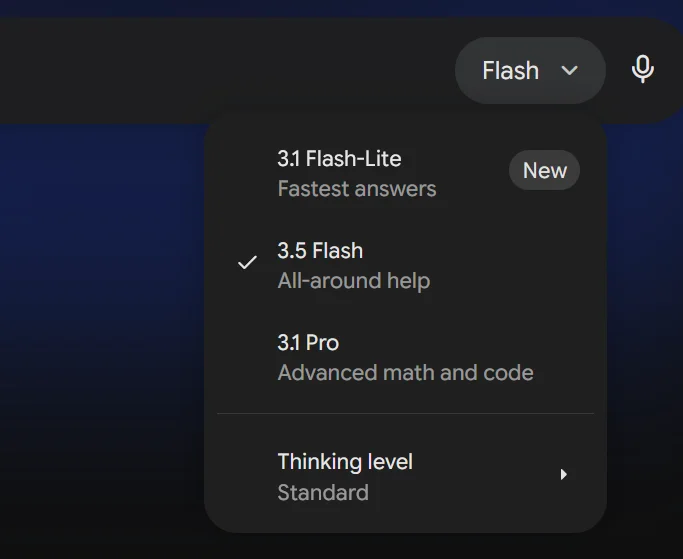
Gemini currently has two model lines: Pro and Flash. The default workhorse is now Gemini 3.5 Flash: fast, but also capable on agentic and coding work. Pro remains the higher-end line for specific Pro features, long documents, and complex multimodal analysis. On gemini.google.com, the free plan uses 3.5 Flash, while paid plans unlock higher quotas and Pro features depending on the plan.
Plan Comparison: Free, AI Plus, Pro, Ultra
Google’s AI subscription plans changed names and contents several times between 2025 and 2026, confusing many users. Below is the current state as of May 30, 2026.
Free: uses Gemini 3.5 Flash. Basic chat, translation, and simple Q&A all work. There is a daily conversation limit, and image generation and Deep Research quota are restricted. Completely fine for occasional use.
Google AI Plus (about NT$260/month in Taiwan): uses Gemini 3.5 Flash, gives 2x the free plan usage, unlocks more video generation / Gemini Notebook (formerly NotebookLM) / Workspace features, and includes 200 GB Google One storage. Pro model and Deep Research quota should follow the Google AI plan page and checkout page. Good for people who use AI every day but do not generate many images.
Google AI Pro (about NT$650/month in Taiwan): higher Gemini usage, Gemini 3.5 Flash, Gemini 3 Pro / Deep Search / agentic features in Google Search, 1,000 Google Flow credits, Gemini in Workspace, YouTube Premium Lite, and 5TB Google One storage. Heavy users usually choose this.
Google AI Ultra (from about NT$3300/month in Taiwan): the highest-tier plan. It includes all Pro features plus 5x or 20x Pro usage, priority access to features such as Deep Think / Gemini Spark depending on region and language, and 20TB+ Google One storage. For most people, Pro is enough.
For a full plan comparison, see Gemini Free vs Google AI Pro.
Plan Decision Table: Free, Plus, or Pro
| What you actually need | Recommended plan | Why |
|---|---|---|
| Occasional questions, translation, and quick lookup | Free | 3.5 Flash is fast, and light usage does not justify paying first |
| Daily AI use, higher quota, and research / Workspace features | Google AI Plus | You get more quota than the free plan without jumping straight to Pro |
| Heavy image generation, background removal, article visuals, and 5TB Google One | Google AI Pro | Nano Banana quota and storage are the real Pro selling points |
| Team-level quota, 20TB+ storage, and priority access | Google AI Ultra | Most individuals do not need it unless quota demand is already clear |
In plain terms: the upgrade question is not whether the free plan is good; it is whether you use the Google ecosystem, Deep Research, or Nano Banana image generation every day. If not, Free or AI Plus is usually enough.
Gemini 3.5 Flash, 3.1 Pro, and 3 Flash: When to Use Which
These model names are easy to mix up.
As of May 30, 2026, 3.5 Flash is the default workhorse in the Gemini app and Google Search AI Mode, and the API supports a 1M token context window. 3 Flash Preview is the previous speed-oriented model. 3.1 Pro remains the higher-end Pro line and preview option. 3.5 Pro has only been officially previewed for next month, so it should not be written as available yet.
3.5 Flash is no longer just the “lightweight and fast” option. Google positions it around speed, agentic workflows, and coding, and its official benchmarks show it beating 3.1 Pro on multiple coding, reasoning, and agentic tasks. For daily lookup, translating a paragraph, or asking a simple question, use 3.5 Flash directly.
Pro’s value depends on the task and the plan. Switch to 3.1 Pro when you need specific Pro features, long-document work, multimodal analysis, or higher quota inside a paid plan. Do not keep assuming that “Flash only fits simple tasks” based on the older Flash generation.
Practical setting: default to 3.5 Flash, and manually switch to 3.1 Pro only when the UI clearly offers it and the task really needs higher-end Pro features.
Chinese Ability Test
Gemini’s Traditional Chinese is already decent in 2026.
When chatting in Traditional Chinese, replies are natural most of the time. Occasionally it uses words more common in Simplified Chinese, which can feel awkward to Taiwan readers, but not very often. It is similar to ChatGPT’s Chinese performance; both have this issue.
It also understands Chinese prompts well enough. When asked in Chinese to analyze an English report and reply in Chinese, the result is smooth.
But Gemini is weaker in one Chinese area: long-form writing. Ask it to write a 2,000-character Chinese article, and the output tends to feel dry, like reading a spec. This is a Gemini model trait, not only a Chinese issue; English long-form can feel the same. For long-form writing, Claude is steadier.
More detailed Chinese usage tips are in Gemini Chinese Guide.
Another common complaint is that new features always launch in English first, while Chinese waits weeks or even months. Chinese prompts for image generation can also be incorrectly blocked by Google’s safety filters. Harmless prompts like “a penguin sitting in a cafe” may be rejected, while the English prompt passes immediately. Chinese users should be mentally prepared for this.
Traditional Chinese TL;DR
The most useful advice from Gemini Chinese Guide is simple:
- Start by asking it to reply in Taiwan Traditional Chinese with Taiwan wording.
- Make Chinese prompts concrete, structured, and example-based instead of just saying “organize this.”
- For technical tasks, mix Chinese and English: keep programming terms in English and specify Traditional Chinese output.
Gemini can work in Chinese. It just needs the language preference stated clearly. Daily chat, translation, and PDF Q&A are fine; long-form Chinese writing still fits Claude better.
Google Ecosystem Integration: Gemini’s Biggest Selling Point
If Gemini were only an independent chat window, it would not have much unique advantage over ChatGPT and Claude.
What makes Gemini powerful is its integration with the Google ecosystem.
One-sentence definition: Gemini is the AI layer inside Google services, not just another chatbot. Its value comes from Gmail, Docs, Sheets, Search, and Photos, where you already work.
Gmail: when you receive a long email, Gemini can summarize key points and draft a reply inside the message. No copy-paste into another window.
Google Docs: while writing a report, ask Gemini to continue, adjust tone, or translate into another language.
Google Sheets: ask Gemini to write formulas and analyze data trends.
Google Search: the AI summary at the top of search results is Gemini.
Google Photos: search photos with natural language. “Find night scenery photos from Japan last year” can actually work.
These features are scattered inside tools people already use. Google’s smartest AI strategy is not fighting ChatGPT for a standalone app market, but turning AI into the base layer of Google services.

Image Generation: Nano Banana 🍌
This is Gemini’s most recommended feature.
Gemini’s built-in image generation model is called Nano Banana (previously the Imagen series). Describe the image in natural language directly in the chat box, and it generates it.
Compared with Midjourney, Nano Banana understands instructions much better. Write a description in Chinese and it can accurately catch composition, tone, and style. Midjourney requires learning its prompt syntax, which has a much higher barrier.
Practical tip: specify “colored pencil style, no gradients.” This lowers the AI feel a lot. Lines have a hand-drawn texture, and colors appear in blocks rather than smooth gradients. It works well for article visuals and social posts.
Generation quality is in the upper tier of AI tools. Finger counts are much better than before, and text rendering has improved a lot, though Chinese text still sometimes fails.
Gemini’s AI background removal is also worth mentioning. It works well and fast on product shots and portraits. The instruction needs to be explicit, like “remove the background and keep only the foreground person.” If the instruction is vague, it may damage elements you wanted to keep.
The free plan has generation limits, and Pro or higher has much more quota. Heavy image generation is one reason to upgrade to Pro. A full drawing tool comparison is in AI Image Tools Comparison.
Deep Research: Let Gemini Do Research for You
Deep Research is available only on Pro and higher, and it is one of Gemini’s differentiators.
Give it a research topic and it automatically searches multiple web sources, reads content, cross-checks, and finally organizes a source-cited research report. The process takes a few minutes depending on topic complexity.
Best-fit tasks for Deep Research: industry background, competitor comparison, pre-writing research, and long-document cross-checking. It should not be treated as the final answer because sources still need spot-checking and time-sensitive numbers need source verification.
A practical use case: data collection before content creation. Before writing an article, send the topic to Deep Research first. It gathers related information, data, and viewpoints, saving the time of opening pages one by one, reading them, and taking notes.
Compared with direct Google Search, Deep Research’s advantage is that it “reads” page content, not only gives links. Compared with Perplexity, Deep Research reports are more structured and source citations clearer.
Note that Deep Research is not magic. The data it finds may not be the latest, and it may occasionally cite outdated sources. Important information still needs verification. Its text is long, sometimes too verbose, and hallucinations can happen. Cross-checking with other models is recommended.
If the task is more about choosing a search tool, read AI Search Tools Guide. Gemini Deep Research is report-style research; Perplexity and ChatGPT Search are closer to daily verification and citation workflows.
A Practical Set of Gemini Use Cases
Image generation: article covers and social post visuals, using colored pencil style to reduce the AI feel. Background removal also goes through Gemini. It is efficient but needs precise instructions. This is the most-used Gemini feature.
Deep Research: data collection before writing articles, market research, competitor analysis.
AI support inside the Google ecosystem: Gmail summaries, Docs editing. You do not need to force yourself to use these features; they are just there and easy to use when convenient.
Quick Q&A: check a fact, translate a paragraph, ask a simple question. Gemini, ChatGPT, and Claude can all do this; use whichever window is open.
Long-form writing and software development go to Claude. Creative ideation and brainstorm go to ChatGPT. Each tool has its strongest scenario. Gemini’s strengths are images, research, and Google ecosystem integration.
How to Divide Work with ChatGPT and Claude
| Scenario | Choice | Reason |
|---|---|---|
| Image generation | Gemini | Good instruction understanding, stable quality |
| Data research | ChatGPT/Gemini Deep Research | Automatic search + organization saves time |
| Long-form writing | Claude | Strongest instruction following |
| Software development | Claude Code | Best tool use + context management |
| Creative ideation | ChatGPT | Many ideas, strong divergent thinking |
| Daily Q&A | Whichever is convenient | All three are similar |
Gemini can write long-form text, and ChatGPT can generate images. But after using them for more than half a year, the workflow naturally settles into this division. For the full comparison, see Complete AI Model Comparison.
Should You Subscribe to Google AI Pro?
The answer depends on what you use Gemini for.
Free plan is enough for: occasional questions, translation, simple lookup. Gemini 3.5 Flash speed and quality are entirely enough for daily casual use.
AI Plus (about NT$260/month) fits: people who use AI every day and need more quota, video generation, or Gemini Notebook / Workspace access than the free plan, but do not need heavy image generation.
Pro (about NT$650/month) fits: people who need higher Gemini usage, Deep Research / advanced Google Search features, heavy Nano Banana image generation, or use Google ecosystem as their main work environment.
NT$650 per month is not cheap. But if Deep Research and image generation are actually used, the saved time is worth it. One Deep Research run takes around 5 minutes; doing the same manually takes at least half an hour. Run it a dozen times a month and the time pays back.
Detailed plan comparison: Gemini Free vs Google AI Pro.
Penchan’s Take
Penchan currently subscribes to Google AI Pro. The biggest motivations are heavy Nano Banana image generation and very large storage. Article images and social assets almost all come from Gemini. The prompt style “colored pencil + no gradients” keeps the AI feel low. Logo character scenes switch to other tools only when brand consistency matters.
Gemini’s limitations and fussiness are real: Chinese prompts for images get randomly rejected, new features launch in English first, and long-form writing feels dry. These are structural issues and unlikely to be fixed quickly. Long-form still goes to Claude, ideation still goes to ChatGPT, and Gemini’s role is “images + research + Google ecosystem.”
Deep Research sometimes cites outdated sources, so important numbers are checked manually again. But the time saved from not opening ten-plus tabs is real. Most pre-writing research now goes to Deep Research.
This article is updated regularly. Content reflects the actual state at the time of writing. Plan pricing and features may change with Google updates; check the latest official announcement.